
Hi
Three months ago, my old Acer Espire 15 with 8 GB of RAM and a 1 TB (1000GB) hard drive gave up the ghost because Windows 10 (the original operating system) suddenly wouldn’t boot anymore. Since I didn’t want to throw the old-good Laptop away, I decided to reinstall Windows 10 – 2022 Update, Version 22H2 from the Bill Gates Store, and that was a big mistake on my part, which I was quite annoyed about afterwards… Along with Wins 10 I also installed Ubuntu 24.04.4.
The first annoyance was the demanding for my mobile phone number. What on earth did Microsoft wanted my phone number for? OKAY, let get over it and I gave the number… The installation went forward with creations of different scrap (what I never need e.g. OneDrive, cloud bullshit, etc.)… and then finally with the PIN for Sign-In. A PIN? I felt I was applying for a bank card. Well, for the sake of my Acer Laptop I gave in and created a PIN…
Yesterday my old-trusty Acer with its 3-months old 22H2 Wins 10 failed to boot and bitched that there wasn’t the boot device. Yuk!
The same bullshit as it bitched 3 months ago. This time I’ve decided to ditch Microsoft and switch completely to Linux – no Windows boot and all the Windows scraps. For that, I need to clean up (or format) my 1 TB hard drive. But the first question is: which Linux? Linux is like fruit – which fruit should it be? Mango? Banana? Peach? Chôm-Chôm? Long Nhan?
I’m familiar with UNIX and Ubuntu. What about the Windows-like Mint? No, I don’t trust Windows, so Mint is out. So, Ubuntu, SUSE, or Red Hat? Or something more radical: FreeBSD? FreeBSD is UNIX, and I’m a UNIX fan. However, FreeBSD is only a niche for certain high-end applications, and its market share is vanishingly small (around 1–2%) -more about FreeBSD and FreeBSD versus Linux. Therefore, I looked into SUSE and Red Hat and found that neither system offers features that would convince me to switch. Both have advantages over Ubuntu, but also disadvantages. Next, I’ll check the system requirements of each Linux distribution.
Ubuntu (24.04.4 LTS)
Processor: 2 GHz dual-core 64-bit processor.
RAM: 4 GB (Recommended for reasonable performance; 2 GB is the absolute minimum).
Storage: 25 GB free space (Minimum).
Display: 1024x768 screen resolution.
Graphics: GPU with 3D acceleration support (256 MB VRAM recommended).
Installation: A USB port is needed for the installer medium.

OpenSUSE 13.1
Processor: Pentium III 500 MHz (Pentium 4 2.4 GHz or AMD64/Intel64 recommended).
Memory (RAM): 1 GB minimum, 2 GB or more strongly recommended.
Hard Disk Space: 3 GB for minimal install, 5 GB for graphical desktop (more recommended for user data).
Graphics & Sound: Most graphics cards supported; 800 x 600 resolution (1024 x 768 or higher recommended).
Installation: DVD or USB drive capable of booting.

Red Hat (RHEL9,7)
Intel/AMD: x86-64-v2 microarchitecture or higher.
Architecture: Specifically x86-64-v3 (required), ARM64 (aarch64), IBM Power (ppc64le), IBM Z (s390x), and RISC-V.
RAM: Minimum: 2 GB RAM. Recommended: 4 GB+ RAM.
Disk Space: 10 GiB for minimal installation. Recommended: 20 GB+ unallocated space.
File Systems: Supports EXT4, XFS (default), and Btrfs.
Virtualization: Supported on KVM, VMware, and other hypervisors with Intel VT-x o
After careful consideration, I decided to install Ubuntu again and later perhaps FreeBSD as a second UNIX-BSD on my Acer laptop, which has sufficient storage space (1 TB or 1000 GB) and enough RAM (8 GB).
What I’m about to describe, however, is not funny; installing Ubuntu as the sole, standalone operating system on a laptop requires considerable effort. The reason for this, although I’m not entirely sure, is that Microsoft’s Windows 10 update 22H2 didn’t want to tolerate another operating system alongside it and therefore corrupted the boot sector, destroying itself AND its competitor. And that’s precisely the problem I don’t find amusing. Since I hadn’t noticed that the 1TB hard drive had been reset to its original raw state, at first, everything seemed fine, but after 15 minutes or so, an error message suddenly appeared indicating I/O problems, and the installation process was aborted. I was prompted to send a report to the Ubuntu developers. Naturally, I didn’t do that just because the simple installation had failed.
So I started investigating the I/O problems. My first thought was that the hard drive was “kaputt.” I booted Ubuntu-USB into trial mode and ran lsblk to find out which device was for the 1TB hard drive. It showed /dev/sda. Wow!.. fsck also returned the same meaningless muck: I/O errors. So what now? Is the 1TB disk really “kaputt”? Or was Microsoft simply using this trick to prevent me from switching sides and joining her arch-enemy? I don’t know.
I restarted Ubuntu in Trial mode and tried to format the hard drive with the utility “Disks” (click on the search box in the upper left corner of the screen, type “Dis” and several options will appear, click on the hard drive icon), but that also failed badly.
If “fsck” and “Disks-format” fail, there must be other tools that can tell me more about the state of my 1TB hard drive. I sifted through my ancient UNIX System V documents (printed in March 1985) and figured out how to prepare a raw hard drive for UNIX. Linux isn’t UNIX, but it’s a kind of virtual clone of it because Linus Torvalds didn’t have the money for an AT&T Unix license. So he developed Linux, which has almost all the identical features of UNIX —not a copy, but his own creation with the same name and functionality. This can be seen in the names of the shell commands such as ls, cd, mkdir, lsblk, mkfs, parted and so on.
Make an unusable hard disk usable.
Boot Ubuntu from the USB drive and run it in trial mode. Then press Ctrl+Alt+T to open a terminal. Run the following commands:
Joe@Acer~$lsblk                                            <--- Search for /dev/sdx for the drive. In my case, /dev/sda.
Joe@Acer~$sudo parted /dev/sda mklabel gpt                 <--- make the global table
Joe@Acer~$sudo parted -a opt /dev/sda mkpart ext4 0% 100%  <--- create 1 partion of ext4 from 0 to 100 -meaning: the whole disk
Joe@Acer~$sudo mkfs.ext4 -n /dev/sda1                      <----create File System etx4 in sda1 (the created first partition)
Joe@Acer~$sudo fsck -y /dev/sda1                           <----check for sure...
If the last “fsck” run was successful, you can theoretically install Ubuntu now. However, to be absolutely sure nothing else goes wrong, I started “GParted” (how? Just like with the “Disks” utility) and formatted the hard drive instead of using Disk Utility, since “GParted” is faster.
Installing Ubuntu 24.04.4 LTS
Simply follow the interactive step-by-step instructions until you reach the Ubuntu installation screen and are asked for the installation location: Select “Erase disk and install Ubuntu,” click on “Advanced features” and then select "Erase disk and use ZFS."
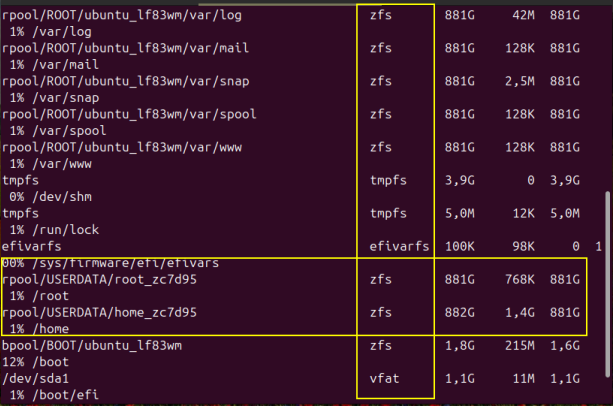
Why ZFS? ZFS originally stood for Zettabyte File System. It’s an advanced 128-bit file system and logical disk manager developed by Sun Microsystems for storage capacities with high data integrity and high performance, and is now widely used in Linux, FreeBSD, and similar systems. It’s faster and more reliable than ext4 and other file systems. Selecting “Erase disk and use ZFS” overwrote the ext4 file system (which was merely a temporary measure to make the disk accessible again) and installed the new ZFS file system.
Now you can sit back and wait until the Ubuntu installation is complete on your computer. Afterward, run the following command in the terminal to bring Ubuntu to the newest stand:
Joe@Acer~$sudo apt update     <-- make sure that everything is up to date
Joe@Acer~$sudo apt upgrade    <-- make sure that old stuffes should be upgraded.
Joe@Acer~$
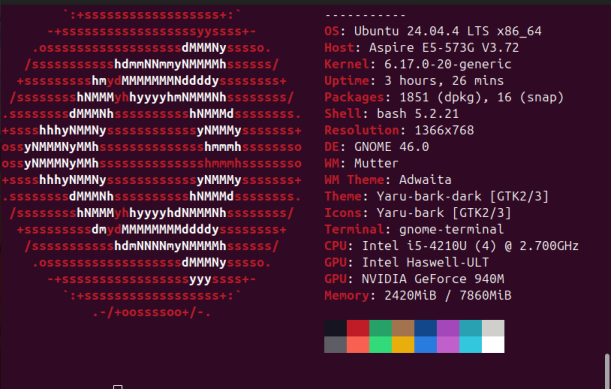
My Acer Aspire 15 has now been given a new life with the latest Ubuntu Linux 24.04.4 LTS and runs with the highly advanced Zettabyte File System.
 83% thành viên diễn đàn không hỏi bài tập, còn bạn thì sao?