# Cách lấy link file khi mình click trong JTREE
**URL:** https://daynhauhoc.com/t/cach-lay-link-file-khi-minh-click-trong-jtree/35196
**Category:** programming
**Tags:** java-swing, java
**Created:** [September 21, 2016, 3:19pm UTC](https://daynhauhoc.com/t/cach-lay-link-file-khi-minh-click-trong-jtree/35196 "2016-09-21T15:19:31Z")
**Posts on this page:** 2
**Page:** 1
### Author:  [@ngocnam](https://daynhauhoc.com/u/ngocnam)
#### Post date: [September 21, 2016, 3:19pm UTC](https://daynhauhoc.com/t/cach-lay-link-file-khi-minh-click-trong-jtree/35196/1 "2016-09-21T15:19:31Z")
các bác cho em hỏi làm thế nào để lấy link file khi mình click vào nhỉ trong Jtree , e dùng cách này nó ra [/, ảnh vớ vẩn, New folder]
thì không dùng đc 
---
### Author:  [@qtd](https://daynhauhoc.com/u/qtd)
#### Post date: [September 21, 2016, 11:37pm UTC](https://daynhauhoc.com/t/cach-lay-link-file-khi-minh-click-trong-jtree/35196/2 "2016-09-21T23:37:42Z")
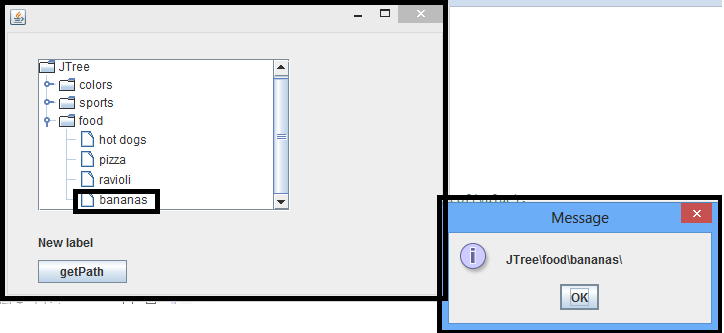
```java
tree.addTreeSelectionListener(new TreeSelectionListener() {
public void valueChanged(TreeSelectionEvent e) {
TreePath treepath = e.getPath();
System.out.println("Java: " + treepath.getLastPathComponent());
Object elements[] = treepath.getPath();
for (int i = 0, n = elements.length; i < n; i++) {
System.out.print("->" + elements[i]);
// JOptionPane.showMessageDialog(null,"->"+elements[i]);
//lblNewLabel.setText(">"+ elements[i]);
value+=elements[i]+"\\";
}
//String x=String.valueOf(value);
//lblNewLabel.setText(String.valueOf(value));
JOptionPane.showMessageDialog(null, value);
//System.out.println(value);
}
});
static String value=""; //add this just before the void main fu
```